Oracle Simphony POS Integration
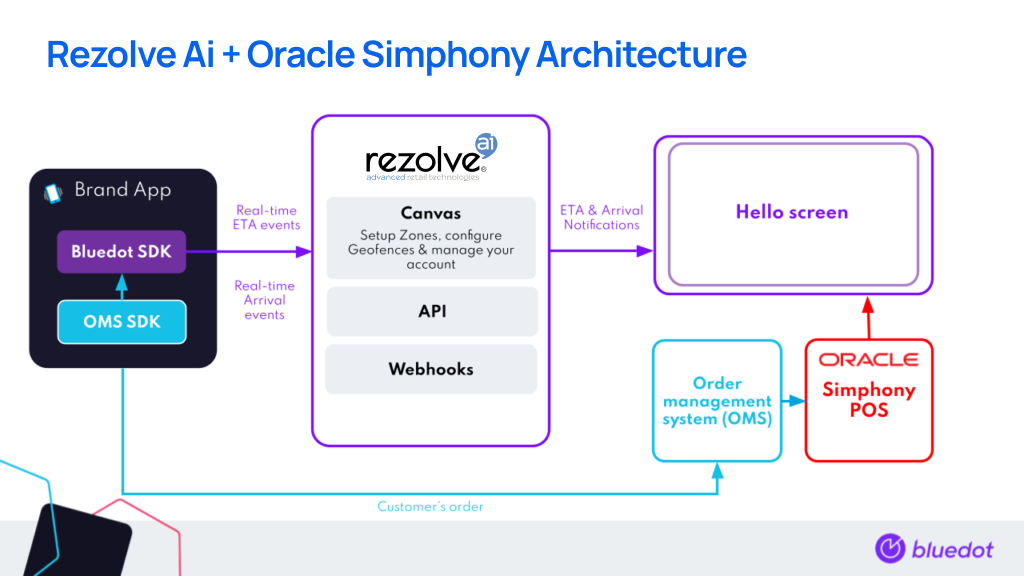
This integration between Oracle Simphony and Rezolve will enable your brand to understand the estimated time of arrival (ETA) and real-time Arrival of your mobile customers. Store Associates can use these insights, for efficient order preparation and a seamless, contactless, curbside pick-up experience.
The real-time updates for your customer’s ETA and actual Arrival can be viewed:
- In your POS (using our webhook service),
- Through an existing integration partner, or
- On Hello screens
Notes
- Before starting your Rezolve Oracle Simphony implementation, a few important notes:
- You need to have an Order management system (OMS) implemented which creates orders in the Simphony POS
- Your brand app must pass the
OrderIDfrom the OMS to the Rezolve SDK - The OMS should add the
OrderIdtoPCheckInfoLinesof the Simphony POS check. - Implement Tempo for ETA & Arrival notifications
- You’ll continue to use your POS to view the actual order details and make adjustments (additional items, cancellations, refunds etc.)
Integration Architecture
Integration Steps
1. Integrate the Rezolve Point SDK within your mobile app:
2. For every order, the app will have to define the following fields in the custom event metadata.
Mandatory
- OrderId (this should be the OrderID generated using the OMS)
- CustomerName
Optional You can attach any of the following customer information to each ETA and Arrival Event to help your in-store team understand the customer and power a seamless curbside experience.
The type of information you may want to attach includes Customer MobileNumber, VehicleModel, VehicleColor, VehicleRegistration._
Android example
class TestApplication extends Application
{
    @Override
    public void onCreate() {
        ...
        Map<String, String> metaData = new HashMap<>();
        //Mandatory
        metaData.put("hs_OrderId", <OMS OrderID>);
        metaData.put("hs_CustomerName", <Customer Name>);
        //Optional
        metaData.put("hs_MobileNumber", <Mobile Number>);
        metaData.put("hs_VehicleModel", <Vehicle Model>);
        metaData.put("hs_VehicelColor", <Vehicle Color>);
        metaData.put("hs_VehicelPlate", <Vehicle Plate>);
        // Setting metaData object in setCustomEventMetaData with BlueDotPointService.
        getServiceManager().setCustomEventMetaData(metaData);
        // Authenticate.
        getServiceManager().sendAuthenticationRequest(projectId, listener, restartMode)
    }
}
iOS example
func application(\_ application: UIApplication, didFinishLaunchingWithOptions launchOptions: [UIApplication.LaunchOptionsKey: Any]?) -> Boo {
    ...
    // Setting meta data in setCustomEventMetaData.
    BDLocationManager.instance()?.setCustomEventMetaData([
        "hs_OrderId" : "The Olo order id",
        "hs_CustomerName": "The user's name",
        "hs_MobileNumber": "The user's mobile number",
        "hs_VehicleModel": "The user's vehicle model",
        "hs_VehicleColor": "The user's vehicle color",
        "hs_VehiclePlate": "The user's vehicle plate" ])

    // Authenticate
    BDLocationManager.instance()?.authenticate(withApiKey: projectId, requestAuthorization: BDAuthorizationLevel.authorizedAlways)
    ...
   return true
}
3. When an order is placed, the app will start Tempo on the Rezolve Point SDK.
4. The order for the particular OrderID and its ETA will update in real-time on your Hello screen.
If you have any questions about this guide or implementing Rezolve & Oracle Simphony together, reach out to our Engineering Support Team support@rezolve.com.